How Do I Get 5G on My Phone? Complete Step-by-Step Guide
Introduction: Why Everyone Is Talking About 5G
Streaming ultra-clear videos without buffering, joining video meetings that don’t freeze, downloading large files in seconds, and playing online games without lag — this is the promise of 5G technology. Over the last few years, 5G has shifted from being a futuristic concept to a real, everyday feature available on millions of smartphones worldwide. Yet many users still ask a simple question: how do I connect my phone to 5G?
The answer is surprisingly straightforward, but it requires understanding a few key requirements. You need a 5G-compatible device, a mobile carrier that supports 5G in your area, and the correct settings enabled on your phone. Without these three elements working together, your device will continue operating on 4G LTE even if 5G is technically available nearby.
In this detailed guide, we will walk you through everything you need to know about 5G. You’ll learn what 5G actually is, why it matters beyond just speed, what you need to access it, how to check whether your current phone supports it, and how to activate it step by step. By the end of this article, you will clearly understand how to get 5G on your phone and whether you need to upgrade your device.
What Is 5G and Why It Matters?
Understanding 5G Technology
5G stands for “fifth generation” wireless cellular technology. It is the successor to 4G LTE and represents a significant leap forward in mobile connectivity. While 4G revolutionized mobile internet by enabling high-definition streaming and reliable app usage, 5G takes performance to an entirely new level.
The key difference lies in speed, latency, and capacity. 5G networks can deliver download speeds that are dramatically faster than 4G — in some cases up to 100 times faster under ideal conditions. However, speed is only part of the story. 5G also reduces latency, which is the time it takes for data to travel from your device to the network and back. Lower latency means near-instant responses, making video calls smoother and online gaming far more responsive.
Another major advantage is capacity. 5G networks can handle significantly more connected devices at the same time without slowing down. This is especially important in crowded areas such as stadiums, shopping centers, airports, and city centers where 4G networks often become congested.
For everyday users, this means fewer dropped connections, clearer video streaming, and a more consistent mobile experience overall.
Why 5G Matters Beyond Speed
While faster downloads grab headlines, the real importance of 5G goes much deeper. The technology enables innovations that were previously difficult or impossible with older networks. For example, in healthcare, 5G supports telemedicine applications where doctors can monitor patients remotely with real-time data transmission. In transportation, it plays a key role in the development of autonomous vehicles that rely on instant communication with surrounding systems.
Businesses benefit from 5G through improved cloud computing, real-time analytics, and smart manufacturing systems often referred to as Industry 4.0. Public safety agencies can use 5G networks for faster emergency response communication and better coordination.
For regular smartphone users, the advantages are simpler but equally meaningful. Video calls become clearer and more stable. Large app updates download in seconds rather than minutes. Cloud gaming becomes more realistic and responsive. Streaming 4K and even 8K content becomes practical on mobile networks.
As digital services continue expanding, 5G becomes less of a luxury and more of a necessity. Upgrading to 5G ensures that your device can keep up with future apps, services, and innovations that rely on faster and more reliable connectivity.
What Do I Need to Use 5G on My Phone?
To use 5G on your phone, three essential requirements must be met. Without any one of them, 5G will not function properly.
- A 5G-capable smartphone
- A 5G-enabled carrier plan
- 5G network coverage in your location
Let’s break each one down in detail.
1. A 5G-Capable Smartphone
The first and most important requirement is hardware compatibility. Not all smartphones can connect to 5G networks. Older devices were designed only for 4G LTE and lack the necessary modem and antenna systems required for 5G connectivity.
Most modern mid-range and flagship smartphones released in recent years include 5G support. However, simply owning a relatively new device does not automatically guarantee compatibility. Some budget models are still limited to 4G, depending on the manufacturer and region.
To confirm whether your phone supports 5G, you can check the device specifications online, look at the original packaging, or navigate through your phone’s network settings. If 5G bands are listed in the technical details, your phone is capable of connecting to compatible networks.
It’s important to understand that software updates alone cannot convert a 4G phone into a 5G phone. If your device does not include 5G hardware, the only solution is to upgrade to a new 5G-compatible model.
2. A 5G-Enabled Carrier Plan
Even if your phone supports 5G, you will not be able to access it without a compatible mobile plan. Most major carriers now include 5G access in their standard plans, but some may require plan upgrades or specific activation.
Many users ask whether they need a new SIM card to access 5G. In most cases, modern SIM cards that already support 4G LTE are also compatible with 5G networks. However, some carriers recommend upgrading to a 5G-specific SIM card to unlock full standalone 5G features and optimal performance.
The safest approach is to contact your carrier directly or check your account details online. Confirm whether your current plan includes 5G access and whether any additional activation steps are required.
3. 5G Coverage in Your Area
The final requirement is network availability. 5G coverage is expanding rapidly, but it is still more common in major cities and urban areas. Rural regions may have limited or no 5G access at this time.
If 5G is not available in your location, your phone will automatically switch to 4G LTE. This fallback ensures continuous connectivity but does not provide 5G speeds.
Most carriers provide online coverage maps that allow you to check whether 5G is available in your area. Reviewing these maps can help you determine whether upgrading your phone or plan will immediately benefit you.
Here is the remaining part of your long-form SEO blog article, including the remaining sections, expanded content, conclusion, FAQs, and complete FAQ Schema Markup.
How to Check If My Phone Is 5G?
Before trying to activate 5G, the first step is confirming whether your smartphone actually supports it. Many users assume their phone is 5G-ready simply because it is new, but not all devices include 5G hardware. Checking compatibility only takes a few minutes and can save you unnecessary troubleshooting.
Check 5G Support on iPhone
If you are using an iPhone, 5G support begins from the iPhone 12 series and newer models. To confirm your device model, open Settings, then tap General, and select About. Look at the Model Name listed there. If your device belongs to the 12 series or newer, it supports 5G connectivity when paired with a compatible carrier.
Another way to confirm is by navigating to Settings, then Cellular (or Mobile Data in some regions), and tapping Cellular Data Options. If you see 5G options such as “5G Auto” or “5G On,” your device is 5G capable. If these options are missing, your iPhone likely does not support 5G networks.
Check 5G Support on Android
For Android devices, the process is slightly different depending on the manufacturer. Open Settings and go to Network & Internet or Connections. Tap Mobile Network, then look for Preferred Network Type or Network Mode. If you see 5G listed as an option, your phone supports it.
If you do not see 5G in the list, you can verify your phone model online by searching the official specifications page. Manufacturers clearly mention 5G compatibility in their technical details. You can also check the original box of your device, which usually includes a 5G logo if supported.
Can I Upgrade My Phone to 5G with Software?
A common question users ask is whether they can upgrade a 4G phone to 5G using a software update or a new SIM card. Unfortunately, this is not possible. 5G requires specialized hardware components built into the phone, including a compatible modem and antenna system. If your phone lacks these components, the only solution is upgrading to a new 5G-enabled device.
How to Enable 5G on My Phone?
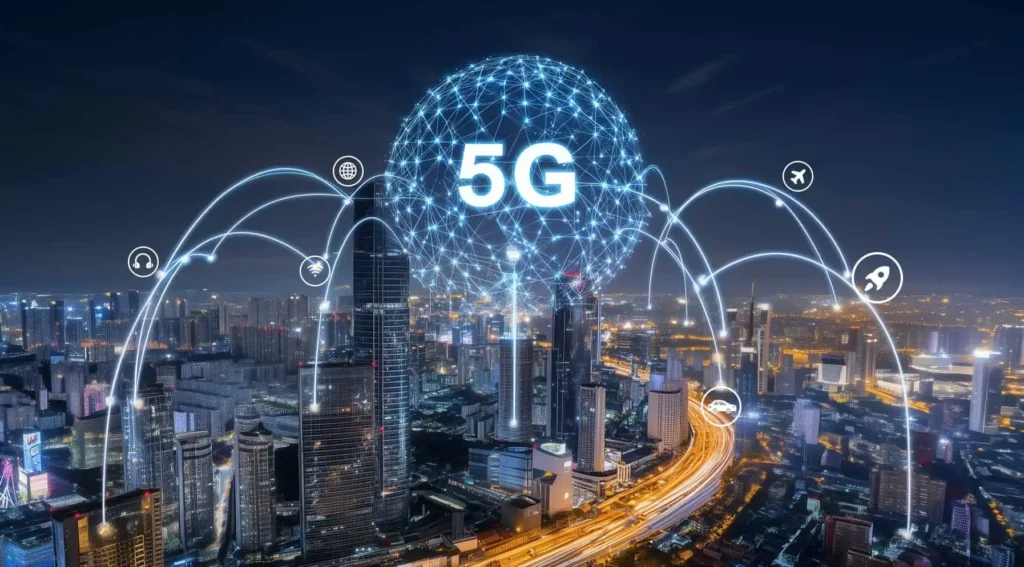
Once you confirm that your device supports 5G and your carrier plan includes access, the next step is enabling it in your phone’s settings. Even 5G-ready phones sometimes default to 4G to conserve battery, so manual activation may be necessary.
How to Activate 5G on iPhone
Step 1: Open the Settings app.
Step 2: Tap Cellular or Mobile Data.
Step 3: Select Cellular Data Options.
Step 4: Tap Voice & Data.
You will see multiple options:
- 5G Auto: This setting allows the phone to switch between 4G and 5G depending on network conditions and battery efficiency.
- 5G On: This forces the device to use 5G whenever it is available.
- LTE: This restricts the device to 4G networks only.
For the best balance between performance and battery life, most users choose 5G Auto. If you want maximum speed at all times, select 5G On.
Additionally, under Data Mode, you can select “Allow More Data on 5G” to enable higher-quality streaming and faster downloads when connected.
How to Activate 5G on Android
Step 1: Open Settings.
Step 2: Go to Network & Internet or Connections.
Step 3: Tap Mobile Network.
Step 4: Select Preferred Network Type or Network Mode.
Step 5: Choose 5G from the list.
Your Android device will now connect to 5G automatically whenever coverage is available. If you use a dual SIM phone, go to SIM Management and ensure that your primary data SIM is set to 5G.
Troubleshooting: Why Is 5G Not Working on My Phone?
Sometimes users enable 5G but still see 4G or LTE displayed in the status bar. There are several possible reasons for this.
First, coverage may not be available in your exact location. Even within cities, 5G coverage can vary between neighborhoods or buildings.
Second, your carrier plan may not include full 5G access. Contact your provider to confirm.
Third, your SIM card may require replacement if it is outdated. Some carriers provide free upgrades to 5G-compatible SIM cards.
Finally, software updates may be required. Ensure your phone is running the latest operating system version, as network compatibility improvements are often included in updates.
If all else fails, restarting your phone can refresh the network connection and trigger 5G detection.
Conclusion
Getting 5G on your phone is not complicated, but it requires the right combination of hardware, carrier support, and proper settings. First, ensure your smartphone supports 5G technology. Without built-in 5G hardware, no amount of software updates or SIM changes will enable access.
Second, verify that your mobile carrier provides 5G coverage in your area and that your plan includes 5G access. While most modern plans include it automatically, some may require activation or a SIM upgrade.
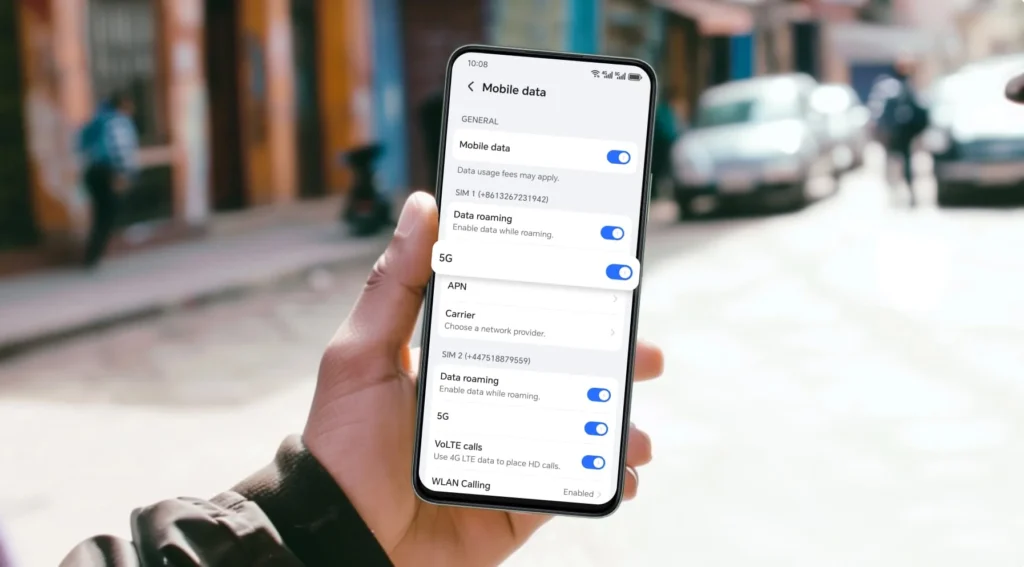
Finally, enable 5G manually in your phone’s settings. Whether you use iPhone or Android, activating 5G only takes a few steps.
Once everything is properly configured, you can enjoy faster downloads, smoother video streaming, lower latency gaming, and improved overall connectivity. As 5G networks continue expanding worldwide, upgrading to a 5G-compatible phone ensures that you are ready for the next generation of mobile innovation.
FAQs
Do I need a new SIM card to access 5G?
In most cases, modern SIM cards are already compatible with 5G networks. However, some carriers recommend upgrading to a 5G SIM for full standalone network access and optimal performance. It is best to confirm with your provider.
Does 5G drain the battery faster?
Yes, 5G can consume more battery than 4G because it uses more advanced radio technology. However, most phones include smart switching features like 5G Auto to conserve battery when high speeds are not required.
Why is my phone showing LTE instead of 5G?
This usually happens when 5G coverage is not available in your current location, or your plan does not include 5G access. Your phone automatically switches to LTE to maintain connectivity.
Can I turn off 5G if I want?
Yes, you can switch your preferred network mode to LTE in your phone’s settings if you want to conserve battery or if 5G coverage is weak in your area.
Is 5G really faster than 4G?
Yes, under ideal conditions, 5G offers significantly faster download speeds, lower latency, and better network stability compared to 4G LTE.
FAQ Schema Markup (JSON-LD)
You can paste this into your WordPress site inside a custom HTML block or schema plugin.